Optimizing Updates with Blue Green Deployment Strategy
Deployment strategies have gotten complicated with all the zero-downtime promises, rollback mechanisms, and infrastructure automation flying around. As someone who’s managed production deployments for web applications and learned the hard way why careful release strategies matter, I learned everything there is to know about blue-green deployment. Today, I will share it all with you.
Blue-green deployment is one release technique; our app development guide covers testing, staged rollout, monitoring and rollback.
Why Blue-Green Deployment?
Traditional deployment methods often require downtime. When updating a server, users might face interruptions—anything from “site temporarily unavailable” messages to broken functionality while you’re mid-deployment. Blue-green deployment reduces these interruptions. By switching traffic between environments, users experience smooth transitions without even knowing you just deployed a major update.
How It Works
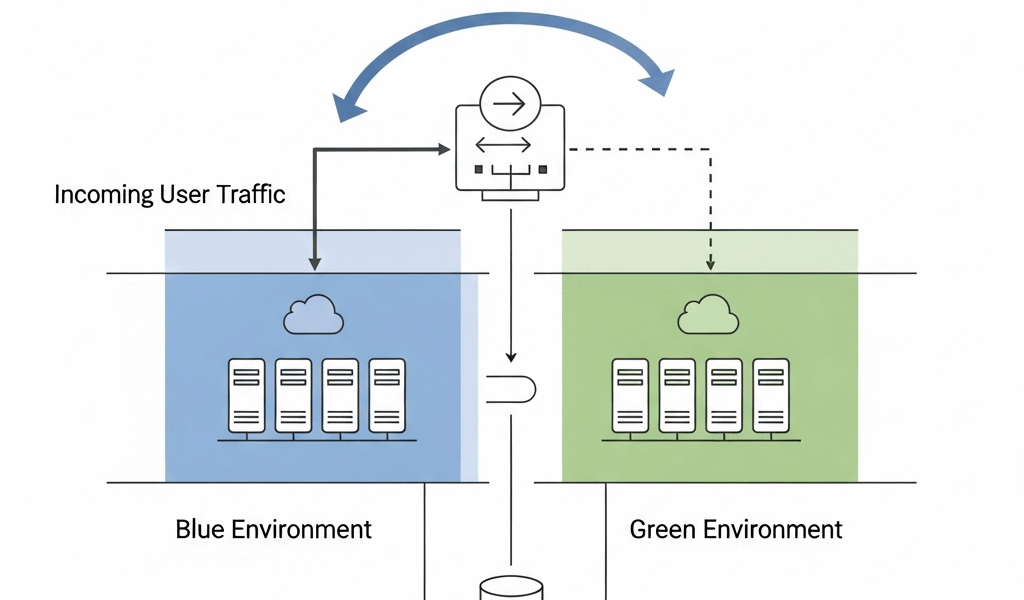
Probably should have led with this section, honestly. In blue-green deployment, an organization maintains two versions of an application. One is active (let’s say blue), while the other (green) is idle. Any updates or new features are deployed to the green environment first. Once the new environment is confirmed to work correctly, traffic is switched from blue to green. If issues arise, the traffic can be switched back to blue—instantly.
Steps Involved:

- Deploy the new version to the green environment.
- Test the green environment for functionality. Run your automated tests, manually verify critical paths, check performance under load.
- Switch user traffic to the green environment. This is usually done via load balancer configuration or DNS changes.
- Monitor for any issues. Watch your error rates, response times, and user behavior closely.
- If issues are detected, revert traffic to the blue environment. This is your safety net.
Benefits
One of the main advantages is reduced downtime—basically zero downtime if you do it right. Users experience minimal interruption during deployment. Another benefit is the ability to test new features in a live environment without affecting the user experience. This ensures that any issues in the new version are identified before real users encounter them.
That’s what makes blue-green deployment endearing to us developers—it’s the strategy that lets you deploy confidently knowing you can instantly roll back if something goes wrong.
Rollback Capability
In case of failure, rolling back is straightforward. Since the old version (blue environment) is still live, you can switch back traffic quickly. This minimizes the impact of any potential failures. I’ve seen rollbacks happen in under a minute when issues were detected—that kind of safety net is invaluable when you’re deploying critical updates.
Maintaining Two Environments
While blue-green deployment offers many benefits, it also comes with challenges. Maintaining two environments is resource-intensive. Organizations need enough resources to run duplicate environments—essentially doubling your infrastructure costs during deployment windows. Proper monitoring and management tools are essential to ensure smooth operation.
Implementing Blue-Green Deployment
Evaluating the infrastructure is the first step. A suitable cloud provider can help in setting up and managing two environments. Next, automated deployment tools simplify the process. Continuous Integration/Continuous Delivery (CI/CD) pipelines are commonly used to manage deployments. Popular CI/CD tools include Jenkins, GitLab CI, and CircleCI.
Key Tools for Automation:
- Jenkins – The old reliable, still powering countless production deployments
- GitLab CI – Great if you’re already using GitLab for source control
- CircleCI – Popular for its ease of use and cloud-native approach
- Spinnaker – Built by Netflix specifically for complex deployment strategies
Organizations should consider version control systems like Git. These systems ensure that code changes are tracked and managed efficiently. Using Infrastructure as Code (IaC) tools like Terraform or AWS CloudFormation can help manage environment configurations. You want your blue and green environments to be identical, and IaC is the best way to ensure that.
Cloud Providers
Many cloud providers support blue-green deployment natively. AWS, Azure, and Google Cloud offer robust solutions. For instance, AWS offers AWS Elastic Beanstalk and AWS CodeDeploy for blue-green deployment. Azure App Service provides deployment slots for a similar purpose—they’re essentially pre-configured blue-green environments. Google Cloud uses tools like Google Kubernetes Engine (GKE) and Cloud Run for deployments.
Best Practices
Ensure thorough testing in the green environment before switching traffic. Automated tests can expedite this process, but don’t skip manual verification of critical functionality. Monitor both environments continuously. Use monitoring tools like Prometheus, Grafana, and New Relic to keep track of what’s happening.
Best Practices Checklist:
- Thorough testing in green environment before switching traffic
- Continuous monitoring of both environments
- Automated tests for efficiency and consistency
- Plan for resource allocation—know what the duplicate infrastructure will cost
- Regular updates to deployment scripts to prevent configuration drift
Challenges
The primary challenge is resource allocation. Running two environments can be costly—you’re essentially paying for double the infrastructure during deployment windows. Effective resource management can mitigate these costs. Some organizations only spin up the green environment when needed, then tear it down after successful deployment.
Scripting and automation complexity is another challenge. Implementing automated tests and CI/CD pipelines can be intricate, especially when coordinating database migrations or stateful services between environments.
Key Challenges:
- Resource allocation and management
- Complexity in scripting and automation
- Ensuring consistent environments between blue and green
- Security concerns with multiple environments
Security Considerations
Running duplicate environments increases the attack surface. Ensuring security in both blue and green environments is crucial. Employ security best practices such as regular vulnerability scans, intrusion detection systems, and secure coding practices. You need to patch and secure both environments, which doubles your security workload.
Case Studies
Several organizations have successfully implemented blue-green deployment. Etsy, a prominent e-commerce platform, uses this method to ensure minimal downtime. By maintaining two environments, they can deploy features with high confidence—critical for a site processing millions of transactions.
Similarly, Capital One uses blue-green deployment to achieve smooth and reliable software updates. For a financial institution, deployment failures aren’t just inconvenient—they’re potentially catastrophic. Blue-green gives them the safety they need.
Examples:
- Etsy – E-commerce deployments with zero downtime
- Capital One – Financial services requiring extreme reliability
- Netflix – Streaming service handling massive traffic
- Spotify – Music streaming with global user base
Conclusion
Blue-green deployment is a robust strategy for modern software delivery. It offers reduced downtime, better testing capabilities, and easier rollbacks. With proper planning and tools, organizations can achieve high availability and reliability. The infrastructure costs and complexity are real, but for applications where downtime is unacceptable, blue-green deployment stands as a valuable method for continuous delivery. If you’re deploying critical applications that can’t afford downtime, the investment in blue-green infrastructure typically pays for itself the first time it saves you from a disastrous deployment.




Stay in the loop
Get the latest web sme updates delivered to your inbox.