Understanding Blue-Green Deployment
Deployment strategies have gotten complicated with all the orchestration tools, rollback mechanisms, and zero-downtime promises flying around. As someone who’s pushed code to production at 3 AM more times than I’d care to admit (and lived to regret a few of those deploys), I learned everything there is to know about safe deployment strategies. Today, I will share it all with you.

What is Blue-Green Deployment?
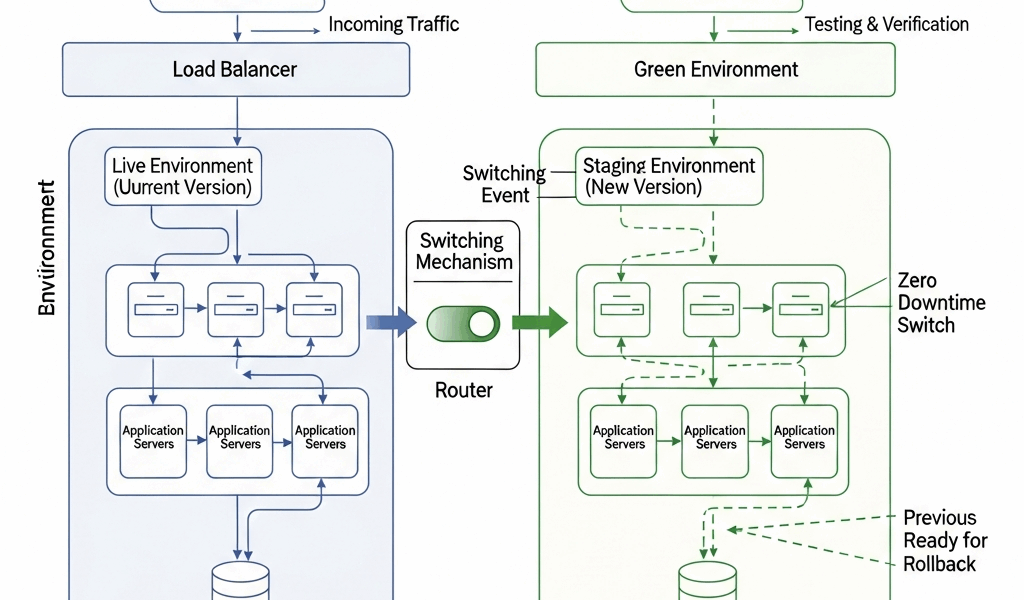
Here’s the basic idea: you maintain two identical production environments. I know what you’re thinking—”two production environments sounds expensive”—and you’re not wrong. But hear me out. One version handles all your live traffic (we call this the blue environment). The other sits ready as the green environment, waiting for the new version of your application.
Both environments run on separate sets of servers or instances. When deployment time rolls around, you push your new code to the green environment. You can test it thoroughly, poke at it, run your integration tests—basically make sure it actually works before any real users see it. Once you’re confident everything’s solid, you route traffic from blue to green. If something breaks (and let’s be honest, something always seems to break), you just switch traffic back to blue while you figure out what went wrong.
Steps Involved in Blue-Green Deployment
- Prepare a clone of the production environment. You need two identical environments: blue (currently active) and green (your staging ground).
- Deploy the new version of code to the green environment. Run your automated tests—this is where you catch the obvious bugs before users do.
- Conduct performance tests. Make absolutely sure the new version can handle your traffic. Nothing worse than deploying something that crumbles under actual load.
- Manually verify critical functionality in the green environment. Yes, even with all your automated tests, there’s no substitute for clicking through the important stuff yourself.
- Switch traffic from the blue environment to the green one. Usually done through DNS changes or load balancer reconfiguration. This is the moment where you hold your breath.
- Monitor the new production environment closely. Keep your eyes glued to those dashboards for at least the first few hours.
- If problems arise, roll back to the blue environment. This is your safety net—the whole reason we went through this trouble in the first place.
Benefits of Blue-Green Deployment
The biggest win here is minimizing downtime. Your users get a seamless transition from one version to the next. By switching traffic between environments, you can deploy without interrupting service. I’ve done deployments where users literally didn’t notice anything changed until they saw the new features.
The rollback story is equally compelling. When something goes sideways (and it will eventually), you can revert to the old environment immediately. Not in five minutes while you scramble to git revert and redeploy. Immediately. That peace of mind is worth its weight in gold when you’re on call.
There’s also the testing advantage. The green environment lets you test in a real production-like setting before actual users interact with it. It’s as close as you can get to production without actually being in production. You catch issues that only show up with real infrastructure, real data volumes, real network conditions.
Challenges in Blue-Green Deployment
Probably should have led with this section, honestly. Maintaining two separate environments isn’t cheap. Your infrastructure costs basically double when both environments are running simultaneously. For smaller projects or startups watching every dollar, this can be a tough pill to swallow.
The strategy also demands robust automation and monitoring. You need sophisticated tools and workflows to ensure smooth traffic switching and efficient rollback processes. Without proper automation, manual intervention becomes a source of errors rather than a solution.
Database synchronization is another headache. If both environments access a shared database, you need to carefully manage data consistency. Some teams handle this with database versioning, feature flags, or backward-compatible schema changes. It’s doable, but it requires planning and discipline.
When to Use Blue-Green Deployment
This deployment strategy shines in scenarios where downtime is absolutely unacceptable. Finance companies can’t afford to have payment processing down. Healthcare systems need constant availability. Large e-commerce platforms lose money every second they’re offline. That’s what makes blue-green deployment endearing to us web developers—it’s the strategy that lets you sleep at night knowing you can deploy safely and roll back instantly if needed.
It’s equally valuable in environments requiring frequent and fast deployments. If you’re doing continuous delivery and shipping features multiple times per day, blue-green deployment supports that velocity while maintaining safety.
Tools Supporting Blue-Green Deployment
Several tools can facilitate smooth blue-green deployment processes:
- Kubernetes: Provides mechanisms such as services and ingress controllers to manage traffic between environments effectively. The learning curve is steep, but the flexibility is unmatched.
- Docker: Ensures consistent environments with containerization, making it easier to maintain identical blue and green setups. “It works on my machine” becomes “it works everywhere.”
- Terraform: Helps in scripting environment setups, ensuring reproducibility and consistency. Infrastructure as code makes maintaining two identical environments actually manageable.
- Jenkins: Can automate the deployment pipeline, managing builds, tests, and switching traffic. Though there are newer CI/CD tools, Jenkins still powers a huge number of production deployments.
- AWS Elastic Load Balancing: Simplifies routing traffic between environments in AWS infrastructure. A few clicks (or API calls) and you’re directing traffic to a completely different environment.
Case Study: Blue-Green Deployment in Action
Consider a large e-commerce platform that receives billions of hits daily. Downtime directly translates to lost revenue and customer dissatisfaction—we’re talking thousands of dollars per minute of outage. Using blue-green deployment, this platform can roll out new features without disrupting service.
The engineering team starts by replicating the entire production environment, ensuring both the blue and green environments are identical. When releasing a new payment gateway integration—always a nerve-wracking change—they deploy the new version to the green environment. Automated tests confirm the integration works without breaking existing functionality. Following this, performance tests verify the new gateway can handle peak loads. Once the team is satisfied with testing results, they switch user traffic to the green environment. The transition is seamless, and customers experience zero downtime.
During the initial hours post-deployment, the team closely monitors the new environment. If issues are detected, they swiftly revert traffic to the blue setup. The rollback happens in seconds, minimizing potential disruptions. This actually happened during a Black Friday deployment where transaction errors started creeping up—they rolled back, fixed the issue, and redeployed within an hour.
Implementing Blue-Green Deployment: Best Practices
Start small. Implement blue-green deployment with non-critical applications initially. This approach provides a learning curve without risking significant disruptions. Your company blog or internal tools make great testing grounds.
Invest in automation. Successful blue-green deployment absolutely requires robust automation for testing, monitoring, and traffic switching. Manual processes are prone to errors and don’t scale. I learned this the hard way trying to manually coordinate a deployment across three team members in different time zones.
Ensure strong monitoring practices. Post-deployment, continuous monitoring is crucial. Monitoring tools provide real-time insights into application performance and user experience. Set up alerts for error rates, response times, and business metrics.
Plan for data consistency. If your application deals with significant data operations, ensure mechanisms are in place to handle data synchronization and consistency between environments. This is where many blue-green implementations stumble.
Regularly test both environments. Maintain the green environment even when it’s not in use. Regularly update and test it to ensure it’s ready for the next deployment. Nothing worse than discovering your standby environment has configuration drift when you need it most.
Conclusion
Blue-green deployment is a powerful strategy for achieving zero-downtime releases and mitigating risks. By maintaining identical environments and providing mechanisms for seamless traffic switching and rollback, it’s proven itself as an effective approach for modern software development practices. Yes, it requires significant resources and robust automation. But the benefits in reliability and user experience often outweigh the costs. As with any strategy, understanding the specifics of your application’s architecture and business needs is crucial for successful implementation. If you’re deploying critical applications that can’t afford downtime, blue-green deployment deserves serious consideration.




Stay in the loop
Get the latest web sme updates delivered to your inbox.